
Support Centre · Guided tour · Step 10 of 10
10. Your account, your privacy and the review
5 min
By the end of this step
You can see everything that has happened to your file and close it when you are done.
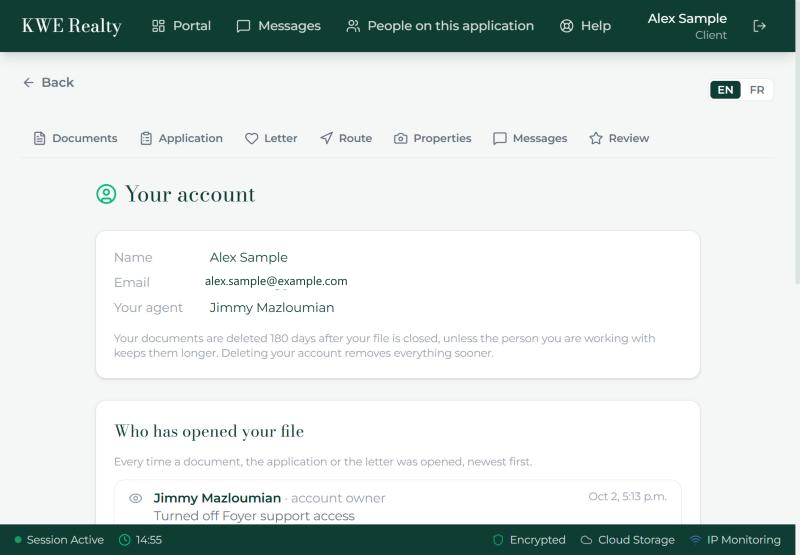
Your name at the top right opens Your account: your name, your email, and the agent you are working with.
Text messages
- The Text messages card has a switch, Send me texts, and a box for your mobile number: +1 and the ten digits. On, you get a text when there is news on your file: a message from your agent, a note on a document, documents accepted, your showing route, a reminder. Each text says what happened and gives a link; it never contains a document.
- The texts come from your agent’s brokerage, or from Foyer. Standard message rates may apply. Reply STOP to any text and they stop, and the switch turns itself off.
Who has opened your file
- Under the card is the full list: every time a document, the application or the letter was opened, by whom, newest first. Your agent, a team member of theirs, a landlord through a package link, and you.
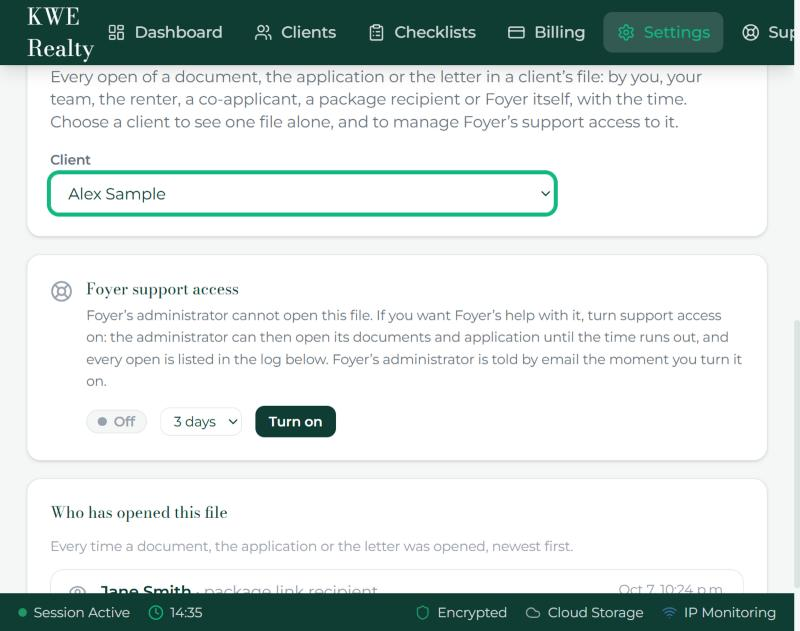
- Foyer’s own administrator cannot open your file. If your agent ever needs Foyer’s help with it, they turn on support access for a few days, and every open the administrator makes is listed here like any other.
How long your file is kept
- Once your agent marks your file completed or archived, your documents are deleted after the period they set, 180 days unless they changed it. The sentence on the card says the number that applies to you.
Deleting your account
- Delete your account, at the bottom, removes your login and everything in your file at once: documents, application, photos, messages. Type DELETE to confirm. It cannot be undone, and your agent no longer has your file.
The review
- The Review tab in the tab bar is for the end: a button that opens your agent’s Google page so you can leave them a few words. It appears once your agent has added their page.
Help
- Support in the top bar opens the Support Centre, with the answer to most questions and this guided tour. Everything in it, and in the portal, is in English and French.
What your agent sees
Your agent has the same access log under Settings, Access log, with the support access switch beside it. They see who opened what, exactly as you do.
Still stuck? Write to support@getfoyernow.com